
Running stitches are one of the most fundamental elements in machine embroidery.
In Ink/Stitch running stitch repeats allow you to stitch the same path multiple times.
This simple parameter can dramatically change how strong or visible an embroidery line appears.
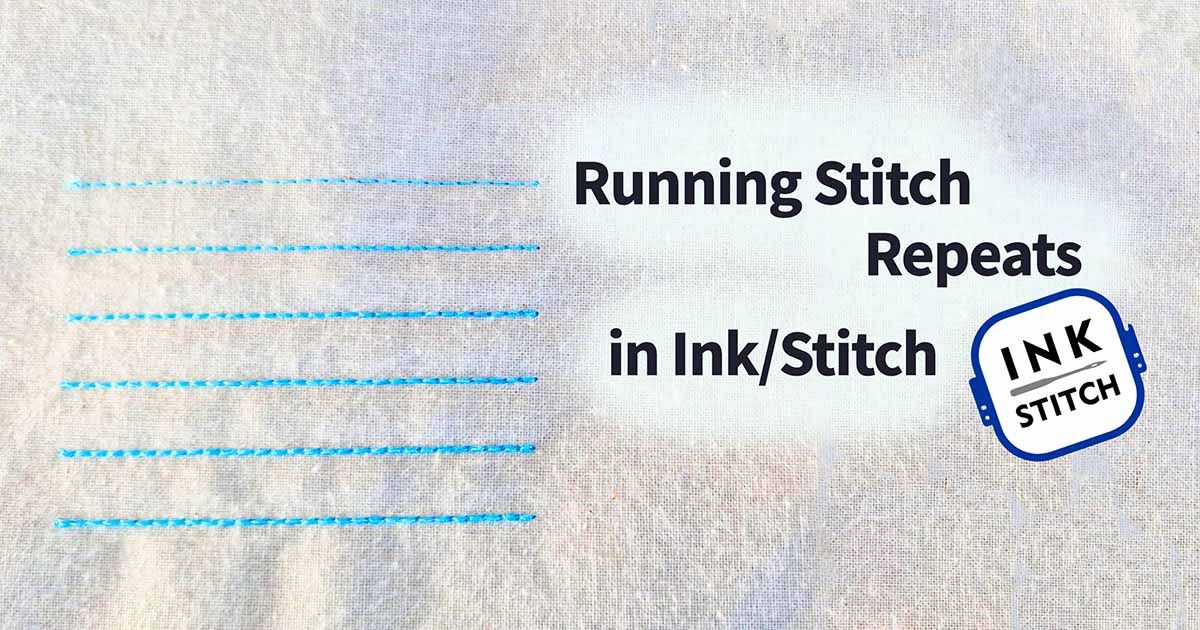
To see the effect clearly, I stitched a small test comparing repeat values from 1 to 6.
If you are new to the software, you may also want to explore the official Ink/Stitch documentation, which explains many embroidery parameters in detail.
Ink/Stitch running stitch repeats: what actually happens
The repeat setting in Ink/Stitch tells the machine to stitch the entire path multiple times.
This is different from the classic bean stitch repeat, which stitches forward and backward between stitches.
Instead, Ink/Stitch completes the entire line and then stitches the same path again.
This creates a layered effect where thread builds up along the line.
The result:
- stronger outlines
- thicker visual lines
- slightly textured embroidery

In the test sample above, the same line was stitched repeatedly.
From top to bottom the repeat values increase from 1 to 6.
The embroidery sample clearly shows how Ink/Stitch running stitch repeats influence the visual strength of a line.
Where to find the repeat setting in Ink/Stitch
You can control the repeat value inside the Embroidery Parameters panel.
When using a running stitch, Ink/Stitch offers a dedicated parameter called Repeats.
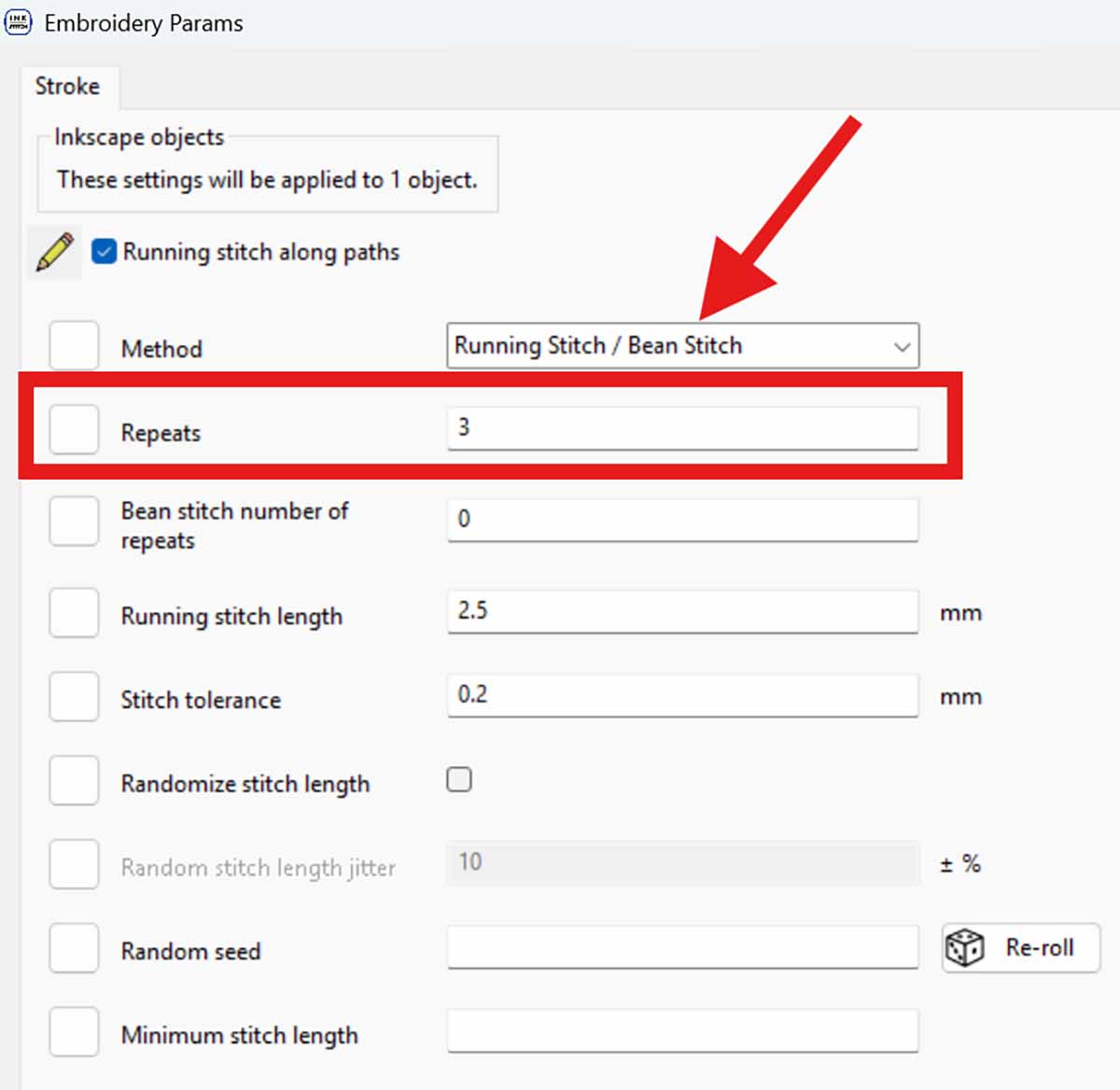
The setting can be found here:
Embroidery Params
→ Running Stitch / Bean Stitch
→ Repeats
If you set the repeat value to 3, the machine stitches the entire path three times before moving to the next object.
This Ink/Stitch running stitch repeats feature is one of the simplest ways to strengthen outlines without adding extra objects.
Comparing the stitched results
To see the difference clearly, I stitched several lines with increasing repeat values.
Each line uses the same stitch length and the same path.
Only the repeat value changes.

The results reveal a clear progression.
1 repeat
A very light line.
Perfect for sketch-style embroidery or delicate details.
2–3 repeats
The outline becomes clearer and more visible while still remaining lightweight.
4–6 repeats
The line becomes significantly stronger and starts to resemble a thin satin outline.
This effect makes Ink/Stitch running stitch repeats especially useful for minimalistic embroidery styles.
When to use Ink/Stitch running stitch repeats
Running stitch repeats are particularly helpful when you want stronger outlines without increasing design complexity.
Typical use cases include:
- sketch-style embroidery
- botanical line art
- lightweight outlines
- decorative borders
- minimalist embroidery designs
Instead of adding additional outline objects, simply increasing the repeat value often produces a cleaner result.
A small tip when using repeats
When the repeat value increases, the machine stitches over the same path several times.
This means:
- stitch count increases
- thread build-up becomes heavier
For delicate fabrics it is usually best to stay between 2 and 4 repeats.
Higher values can still be useful for bold decorative outlines or modern line-art embroidery.
Why this small Ink/Stitch setting is so useful
The repeat parameter is a small feature, but it gives you precise control over how strong a running stitch appears in your embroidery.
By adjusting a single value you can transform a thin sketch line into a clear decorative outline.
If you experiment with different repeat values, you will quickly develop a feeling for which setting works best for each design.
Sometimes the simplest embroidery line — stitched multiple times — produces the most elegant result.
If you want to learn more about embroidery software and beginner-friendly techniques, you may also enjoy our growing collection of articles in Software & Designs.
FAQ – Ink/Stitch Running Stitch Repeats
What does the repeat setting do in Ink/Stitch?
The repeat setting tells Ink/Stitch to stitch the entire running stitch path multiple times.
Each repeat follows the same path and builds up thread, which makes the line appear stronger.
Is repeat the same as bean stitch in Ink/Stitch?
No.
Bean stitch repeats create forward and backward stitches between points.
The repeat setting simply runs the entire path again without reversing between stitches.
How many repeats should you use?
It depends on the effect you want.
- 1–2 repeats for light sketch embroidery
- 3–4 repeats for clear outlines
- 5–6 repeats for strong decorative lines
Testing different values on your own machine is always recommended.
Do repeats increase stitch count?
Yes.
Every repeat stitches the entire path again, which increases the stitch count proportionally.
For example, a line stitched with 4 repeats will contain roughly four times as many stitches as a single running stitch.


Leave A Comment